- HOME
- BI & Analytics
- Tableau Pricing: Detailed Cost Breakdown for 2026
Tableau Pricing: Detailed Cost Breakdown for 2026
- Last Updated : August 27, 2026
- 2.2K Views
- 11 Min Read
Tableau's pricing page shows three numbers: $15, $42, and $75 per user per month. Here's what they don't tell you upfront. That $15 license is view-only. Can't edit. Can't create. Can't explore data beyond what someone else built. The $75 license includes Tableau Prep and full authoring, but you'll need multiple license types across your team. Then there's Enterprise pricing (nearly double), AI features (custom quote only), and embedded analytics (starts at $60,000/year).
Tableau's pricing structure includes role-based licenses, separate add-ons for data prep, custom quotes for AI features, and different rates for embedded analytics. Most teams underestimate the final cost by 40-60% when they first evaluate Tableau. What starts as a sleek data visualization tool, quickly turns into a complex web of licensing, add-ons, and feature gates. If you're trying to figure out the true cost of Tableau and whether it's worth it, you're not the only one. Let's break it all down and explore the best Tableau alternative that gives you everything you need without any unwanted expenses.

Tableau pricing plans: The official breakdown
Tableau's pricing structure splits into two deployment models and two pricing tiers. Most teams underestimate final costs by 40-60% during initial evaluation because the published rates only show license fees. Training, infrastructure, support, and annual price increases add another 30-50% on top.
Deployment options
Tableau offers two ways to deploy: Cloud or Server. The choice affects both your upfront costs and ongoing operational overhead.
Tableau Cloud is fully hosted by Salesforce. You don't manage infrastructure, but you're locked into subscription pricing with limited control over storage and compute resources. If you exceed baseline limits, overage charges show up on renewal invoices. Exact overage pricing isn't published upfront.
Tableau Server is self-hosted on your infrastructure. You handle setup, maintenance, security patches, and backup. This gives you more control but introduces infrastructure costs. At scale, Tableau Server offers core-based licensing: you pay per CPU core instead of per user, which unlocks unlimited users. Core-based licensing starts at 8 cores minimum, with estimated costs around $35,000-$40,000 per core annually. A 16-core deployment runs approximately $640,000/year but supports unlimited users, making it cost-effective for very large organizations or public-facing dashboards.
Standard tier pricing (per user/month, billed annually
License type | Monthly cost | Annual cost | What you get |
| Creator | $75/user/month | $900 | Full authoring, Tableau Desktop, Tableau Prep Builder, all data connectors |
| Explorer | $42/user/month | $504 | View and filter dashboards, export data, subscribe to reportsWeb-based editing, limited creation, can publish to existing data sources |
| Viewer | $15/user/month | $180 | View and filter dashboards, export data, subscribe to reports |
Every deployment requires at least 1 Creator license. You can't run Tableau with only Explorers or Viewers. The Standard tier works for small teams with basic governance needs, but it has limitations. You're capped at 3 sites per deployment, which becomes restrictive as teams grow. Advanced security features like row-level security beyond basic filters aren't available. SAML SSO isn't included. eLearning access isn't included. Tableau Pulse AI features are limited to basic functionality.

Source: G2
Enterprise tier pricing (per user/month, billed annually)
| License Type | Monthly Cost | Annual Cost | vs Standard |
| Creator | $115 | $1,380 | +53% cost increase |
| Explorer | $70 | $840 | +67% cost increase |
| Viewer | $35 | $420 | +133% cost increase |
The price gap between Standard and Enterprise is significant. Viewer licenses cost 133% more on Enterprise. For a 50-person team with 30 Viewers, that's an extra $7,200/year just for view-only access. Enterprise adds features that larger teams need: up to 10 sites per deployment, advanced management and governance tools, enhanced security controls including attribute-based access, SAML SSO and OAuth support, the Data Management add-on, eLearning platform access, priority support, and advanced Tableau Pulse AI features.
What pushes you to Enterprise tier
Teams often start evaluating Standard but end up on Enterprise. The shift happens when you hit specific requirements that Standard can't support. Security requirements push teams to Enterprise. Row-level security beyond basic filters? Enterprise required. Government, healthcare, and financial services typically need Enterprise-level governance and audit trails from day one. Attribute-based access control isn't available on Standard.
Scale is another trigger. Once you exceed 3 sites or need centralized management across departments, Enterprise is the only option. A company with separate sites for Finance, Sales, Marketing, and Operations hits the 3-site limit immediately. AI features also drive the upgrade. Tableau Pulse has limited functionality on Standard. Natural language queries, automated insights, and advanced AI capabilities require Enterprise or the Tableau+ bundle.
Tableau+ bundle (AI-powered tier)
Tableau+ is the newest tier, launched to package next-generation AI features. It includes the Tableau Next platform, advanced Tableau Pulse with natural language queries, Agentforce analytics, integration with Salesforce Data Cloud, Tableau Agent for automated insights, and release preview access to new features before general availability.
Pricing isn't publicly listed. You have to contact Tableau sales for a custom quote. Based on Vendr's 2026 marketplace data and analysis from enterprise buyers, Tableau+ adds 25-40% on top of Enterprise pricing. For a 100-user deployment on Enterprise ($110,400/year), expect Tableau+ to cost $138,000-$154,000/year.
Additional costs to consider:
- Tableau Prep (available only with Creator license)
- AI-powered insights (like Pulse and Einstein Discovery)
- Advanced data governance tools
- Server or Cloud-specific resource overhead
Real-world cost scenarios
Scenario 1: 10-person startup
Your team has 2 Creators (data analysts), 3 Explorers (department leads), and 5 Viewers (executives).
On Standard tier, you'll pay $1,800/year for Creators, $1,512/year for Explorers, and $900/year for Viewers. Total: $4,212/year in licenses.
On Enterprise tier, the same mix costs $2,760 for Creators, $2,520 for Explorers, and $2,100 for Viewers. Total: $7,380/year.
But licenses are only part of the cost. Add onboarding training at $3,000-$5,000, and your first-year total lands between $7,200 and $12,400.
Scenario 2: 50-person mid-market company
Your team has 5 Creators (BI team), 15 Explorers (analysts across departments), and 30 Viewers (managers and directors).
Standard tier costs $4,500 for Creators, $7,560 for Explorers, and $5,400 for Viewers. Total: $17,460/year.
Enterprise tier costs $6,900 for Creators, $12,600 for Explorers, and $12,600 for Viewers. Total: $32,100/year.
Companies at this scale typically choose Enterprise for governance. Add 15% for support contracts and training. Realistic first-year cost: $37,000-$42,000.
Scenario 3: 200-person enterprise
Your team has 10 Creators (central BI team), 50 Explorers (power users across business units), and 140 Viewers (general staff).
Standard is inadequate at this scale. Enterprise tier costs $13,800 for Creators, $42,000 for Explorers, and $58,800 for Viewers. Total: $114,600/year in licenses.
Add premium support at $15,000/year, a training program at $20,000/year, and professional services for implementation at $30,000 one-time. First-year total: $179,600. Subsequent years: $149,600.
If using Tableau Server instead of Cloud, add infrastructure costs: server hardware or cloud instances at $15,000-$25,000/year, plus an IT administrator at 50% FTE for $40,000/year. Server deployment total: $189,600-$214,600/year.
"We looked at Tableau and Power BI. Both were very complicated and costly. We wanted something that we will be able to handle, and didn’t want to hire a FTE specifically for analysis. And thanks to the free trial offered by Zoho Analytics, we got a hands-on experience. Also it's not expensive, so why would I look for something else?"
Alejandro Carbonell
Co-founder, Tutorez
The hidden costs of Tableau you should know before buying
- Increased prices on most plans, particularly for Creator licenses
- AI features like Tableau Pulse are restricted to higher-tier plans
- Embedded analytics tied to complex, custom pricing
- Lack of all-in-one pricing, with everything billed separately
Also,
Pricing complexity
Tableau uses a role-based pricing model with Creator, Explorer, and Viewer licenses. Each comes with different capabilities, and teams often need a mix of all three.
The problem shows up when usage grows. A team might start with a few Creators, then add Viewers across departments. Costs scale quickly, and estimating the final bill becomes difficult without a detailed rollout plan.
Many teams also underestimate add-on costs. Tableau Prep, advanced connectors, and higher storage or compute needs add to the total.
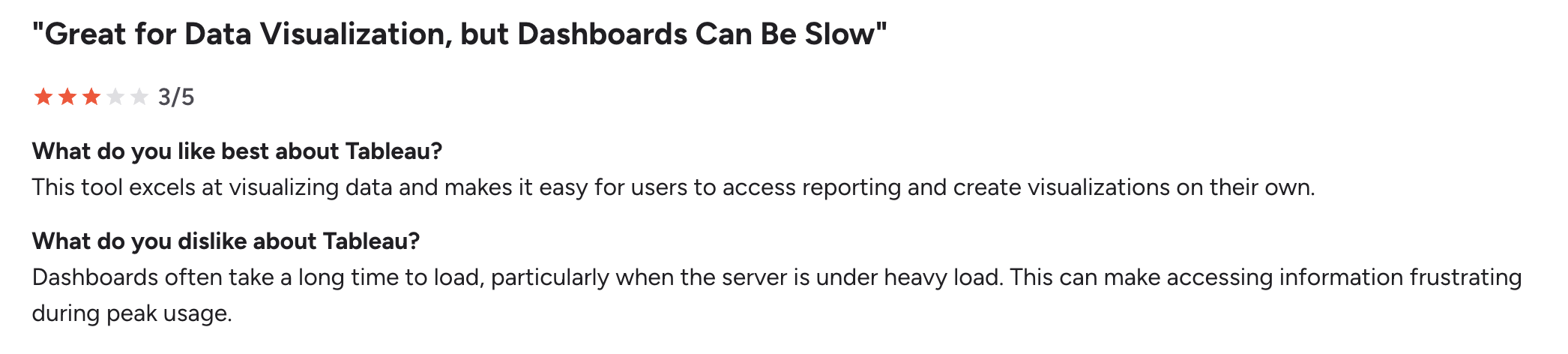
Viewer licensing model
Viewer licenses look affordable at first. But they only allow users to view interactive dashboards. Any small need beyond that, like editing, filtering beyond predefined options, or creating reports, requires an upgrade.
This creates friction inside teams. Analysts end up acting as gatekeepers because most users cannot explore data on their own.
In practice, this slows down decision-making. Teams rely on a few power users instead of enabling broader access.
Source: G2
Add-on dependency
Tableau does not include everything in one place. Data preparation, advanced analytics, and integrations often require separate tools or add-ons.
For example:
- Tableau Prep for data cleaning
- Additional connectors for certain data sources
- External tools for advanced analytics workflows
This increases both cost and operational overhead. Teams manage multiple tools instead of working in a single system.
Data size and performance limitations
Tableau performs well for many use cases, but large datasets can create performance issues, especially without proper optimization.
Handling high data volumes often requires:
- Extracts instead of real-time connections
- Data aggregation before visualization
- Dedicated infrastructure for Tableau Server
This adds complexity for teams without strong data engineering support.
START YOUR 15-DAY FREE TRIAL TODAY
Viewer lock-in
Tableau’s Viewer role limits what most users can do. Viewers can access visualization and dashboards, but they cannot create reports or explore data beyond what is already built.
This creates dependency on a small group of Creators. As more teams adopt Tableau, the number of requests grows. Simple changes like adding a filter, adjusting a metric, or creating a new view require help from the BI team.
Over time, this turns into a workflow issue. Analysts spend time handling requests instead of analysis, and business teams wait for updates instead of working with data directly.
Learning curve
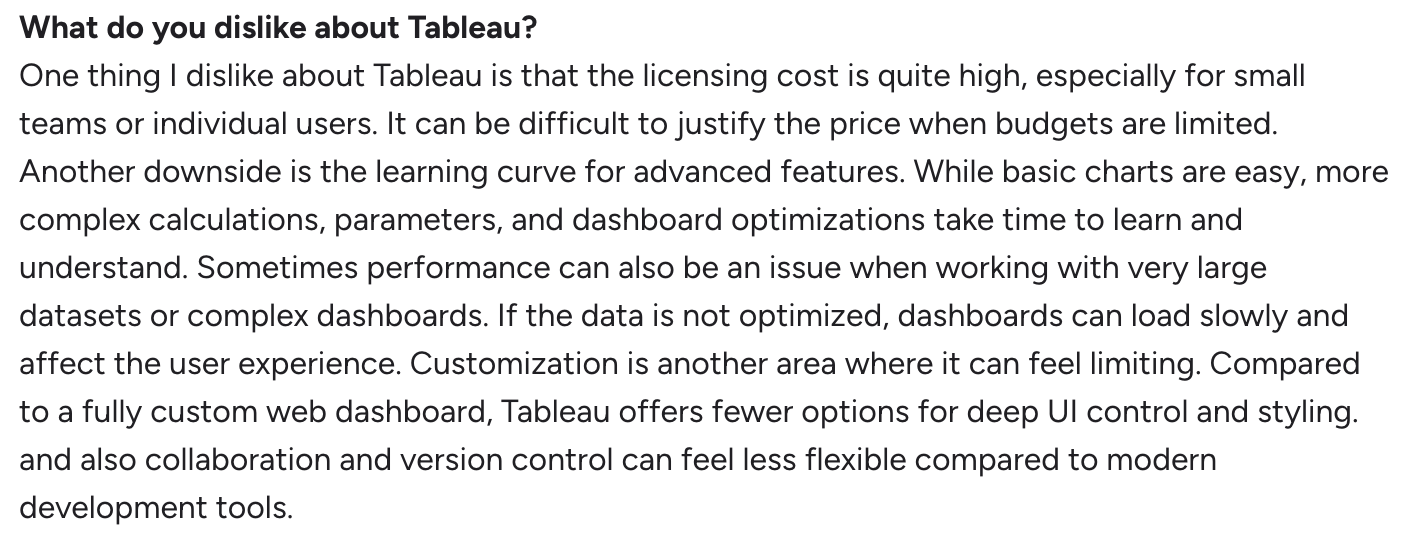
Tableau takes time to learn. Basic dashboards are easy to build, but working with real data often requires understanding joins, calculated fields, parameters, and data modeling.
For teams without a data background, this becomes a barrier. Many companies run internal training sessions before users can work independently.
This affects adoption. A tool meant for self-service still depends on a few trained users in practice.
Source: G2
How to evaluate BI tools before choosing Tableau?
Before you lock into a BI platform like Tableau, it's worth asking a few questions like
Is the pricing truly transparent? Are all features included, or will you be paying for basic things like AI or governance?
Can the platform scale with your business? Will your costs stay manageable as your team grows, or will your cost double when your team doubles?
How does viewer access work? Can everyone see reports, or do you pay for every person who just wants to view a report, even if they're not creating or editing anything?
How steep is the learning curve? Will you need IT support or developer resources to get started? Or can business users hit the ground running?
What's the real total cost of ownership? Are you investing in a complete solution or committing to a platform that charges you separately for every single feature?
Best Tableau alternative: Zoho Analytics (pricing + features)
Tableau dominated the business intelligence market for years. But pricing increased 15-20% between 2023 and 2026, and the role-based licensing model doesn't scale well for most teams. Zoho Analytics uses flat per-user pricing. Everyone gets full access. No Creator/Viewer split. And, that’s exactly why teams are making the switch to Zoho Analytics.
Zoho Analytics is an Agentic-AI powered self-service BI and analytics platform that uses a tiered pricing model based on users and data volume. Plans start small and scale as usage grows, which makes it easier to estimate cost early on.
Get AI without the price tag
Tableau's AI tools are impressive. But they're usually tied to Salesforce or need a license along with the technical complexity.
With Zoho Analytics, on the other hand, AI is front and center. Zia, our smart assistant, empowers everyone, not just analysts. Build reports with simple questions like, "What's our sales trend this quarter?", or even predict outcomes with AI forecasting. You don't need to know SQL or depend on a data team. Just ask, and you get answers.
Pricing that actually makes sense
Tableau charges $15/month for Viewers, $42 for Explorers, $75 for Creators. A 50-person team with mixed roles pays $32,100/year on Standard or $50,400/year on Enterprise.
Zoho Analytics charges $8/user/month for full access. Same 50-person team pays $4,800/year. That's an 85% cost reduction.
All-in-one platform
Tableau splits functionality across multiple products: Desktop for authoring, Prep for data cleaning, Cloud for hosting, and separate connectors for CRM data.
Zoho Analytics includes data prep, blending, visualization, storytelling dashboards and automation in one platform. No separate downloads or add-ons.
"Zoho Analytics is definitely a critical part of the value add we deliver to our customers. It's crucial for our analytics operation, as we use Zoho Analytics for almost all our data visualization and analysis. Our clients are very impressed by the high-quality visualizations and the insights they are able to quickly glean from them. The key takeaways are that it's easy for our clients to see and take action. This BI tool has allowed our engineers to focus on our core competencies while providing constant insights for optimization."
Connor Nobert
Director of Analytics and Technology, Pulse LLC
Faster adoption. No steep learning curve
Tableau requires training on calculated fields, joins, parameters, and data modeling. Most companies run 2-3 week onboarding programs before users can build dashboards independently.
Zoho Analytics is a self-service BI platform designed with business owners in mind, making onboarding smoother with drag-and-drop interfaces, interactive data visualizations, and smart recommendations.
Deploy the way you want
Tableau pushes Cloud deployments. Server is still available but requires managing your own infrastructure, backup, and security updates.
Zoho Analytics give full flexibility by supporting public cloud, private cloud, and on-premises deployment. You control where your data lives
Final thoughts
With Tableau's maze-like pricing plan, it's time to rethink your BI tool. One license to view, another to explore, and a premium one just to create? Want data prep? That's another product. Want AI? You'll need to pay more. But with Zoho Analytics, you skip the pricing drama.
You get a simple, transparent pricing model where you pay based on usage, not roles, so there's no need to juggle different licenses. Whether you're a startup building your first dashboard or an enterprise scaling data across departments, our pricing adapts to you, not the other way around.
So why choose between power and price with Tableau when you can get both with Zoho Analytics?
Zoho Analytics is built for businesses that want advanced analytics, intuitive data visualization, and AI-driven insights without the pricing drama.
- Trusted by 15,000+ businesses globally
- Rated highly by G2, Gartner, Capterra, and TrustRadius
- Affordable plans with advanced capabilities
- Backed by strong support and an AI-driven roadmap
Zoho Analytics has been recognized in the 2025 Gartner® Magic Quadrant™ for ABI Platforms. Read more
Compare feature-by-feature with Tableau to see where Zoho Analytics matches or exceeds functionality at a lower cost.
Rethink what you're paying for
Tableau's pricing model requires tracking Creator, Explorer, and Viewer licenses across departments. AI features cost extra. Data prep requires Creator licenses. Embedded analytics uses custom pricing.
Zoho Analytics uses one license type. Everyone gets AI, data prep, collaboration, and embedding. The price you see is what you pay. Calculate what you'd pay for Tableau with your actual user mix. Then compare it to Zoho Analytics at $8/user/month. If the difference is $15,000+/year, that's budget you could spend on hiring, marketing, or product development. So if you're looking for a smarter switch that fits your budget and actually empowers your teams, Zoho Analytics makes perfect sense.
Why overpay for complexity when clarity is more affordable?
Make the switch now by signing up for a 15-day free trial or get a personalized demo today!
Zoho Analytics: The smarter switch and the best Tableau alternative!
FAQs
Why is Tableau so expensive?
Tableau is expensive as it uses role-based licensing. You pay separately for Creators, Explorers, and Viewers. Enterprise features like AI and advanced security nearly double the base price. Infrastructure, training, and support add another 20-30% on top.
Is Tableau worth the cost?
If you have a dedicated BI team and budget isn't tight, yes. For small to mid-sized teams, the learning curve is steep and most users get locked into Viewer licenses that can't create reports.
What is a cheaper alternative to Tableau?
A cheaper alternative to Tableau is Zoho Analytics which starts at $8/user/month with full access for everyone. No Creator/Viewer split. Includes AI, data prep, and embedded analytics. Same capabilities, 85% lower cost for most teams.
 Vinisha
Vinisha is a Marketing Analyst at Zoho Analytics with a strong passion for both marketing and data. She’s naturally curious about trends and loves diving into data to uncover what drives effective campaigns. She has a knack for simplifying complex information and presents insights in a relatable and engaging way that connects with audiences. Outside of work, she enjoys exploring the creative side of digital marketing.